
How to setup products and offers on my checkout page. #
In this video, you’ll learn how to setup and connect products and offers of your checkout page.
How to Add Products to a Checkout Page #
This guide will walk you through adding products to your checkout page in a funnel.
What you’ll need:
- An existing funnel
- A payment processor like Stripe or PayPal connected (optional for previewing)
Steps:
- Access your Checkout Page:
- Make sure you’re on the Sites page of your funnel builder.
- Navigate to Sales and then Checkout Page.
- Add a Product (Standalone Purchase):
- Click the Plus (+) button next to Products.
- Choose Create a new product.
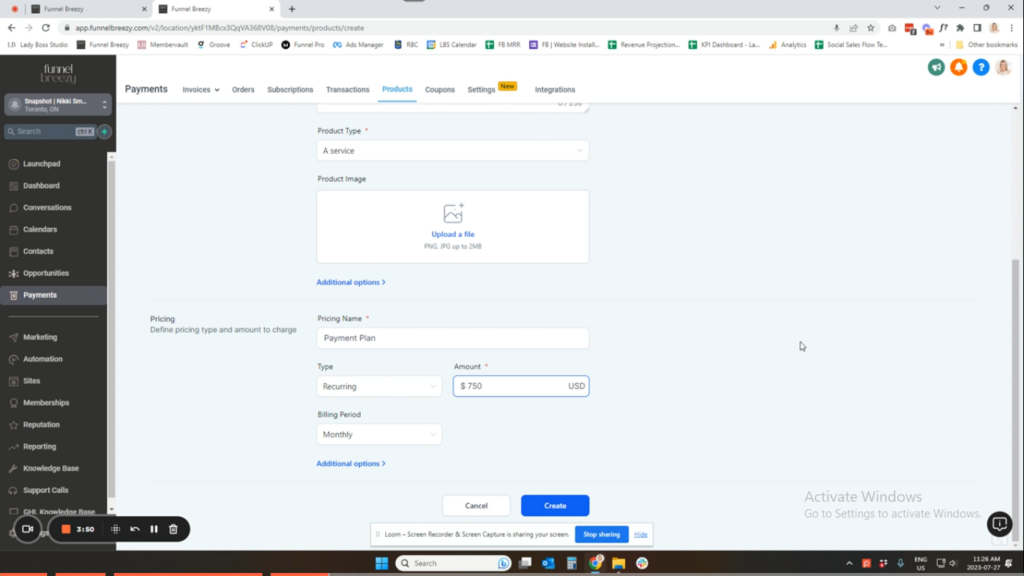
- Enter a Product Name.
- Select the Product Type (e.g., Service, Digital Good).
- (Optional) Add a Product Image.
- Enter the Pricing Name.
- Choose between One-Time Payment or Recurring. If recurring, define the payment plan details.
- Click Create.
- Add a Product with Membership Offer:
- You can’t assign offers to products until you create an offer first.
- Go to Sites > Memberships > Offers.
- Click Create an Offer.
- Name your offer and include the product(s) you want to grant access to.
- Set the offer to Published and Free.
- Click Save.
- Now, repeat steps 2a-2e to create a new product.
- In Additional Options, enable Membership Offer and select the appropriate offer.
- Click Create.
- You can’t assign offers to products until you create an offer first.
- Adding Products to the Checkout Page:
- Go back to Sales > Checkout Page.
- Click the Plus (+) button next to Products.
- Select the products you want to add from the list.
- Click Save.
- Previewing Your Checkout Page:
- (Optional) You can preview the checkout page to see how the products appear. However, it might not show up accurately without a connected payment processor.
Important Notes:
- You cannot sell anything through a funnel without adding products to the checkout page.
- Using a dedicated checkout page in a funnel typically leads to higher conversions than using the built-in checkout option within memberships.
Additional Tips:
- Consider offering different payment plans to make your products more accessible.
- Clearly communicate the product details and pricing to avoid confusion.
By following these steps, you can effectively add products to your checkout page and start selling through your funnel!


