Learn how to create new courses or membership.
Updated on August 9, 2024
How to create a new course or membership. #
In this video, you’ll learn how to create new courses and membership.
How to Create a Course or Membership #
This guide will walk you through creating a course or membership within the platform.
Choosing a Starting Point
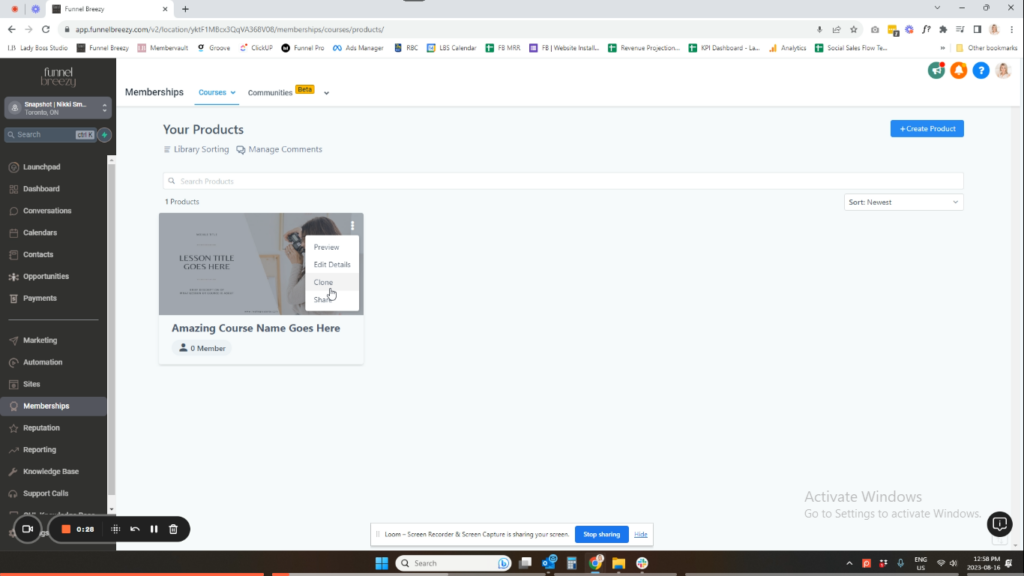
- Navigate to the Memberships, Courses, and then Products section.
- You’ll see a default course already added. You have two options:
- Edit the Default Course: This course contains basic content. Click the three dots (…) and select “Clone” to create a copy you can customize.
- Create a New Course: Click the “Create New” button to start fresh.
Important Note: Whichever option you choose (cloning the default or creating a new one), they both have the same functionality for adding modules, lessons, etc. There are slight presentational differences, but they work the same way.
Moving Forward
- Click on the course you want to work on (cloned or default).
- Content is the same for Courses and Memberships: The way you offer the content and accept payment determines if it’s a course or membership.
Understanding Courses vs. Memberships
- Courses: Typically offered as a one-time purchase with a checkout page for a single payment.
- Memberships: Often involve recurring payments, like a subscription model.


