
Learn how to add in new modules and lessons to your courses.
Updated on August 9, 2024
How to add in new modules and lessons to your course. #
In this video, you’ll learn how to add in new modules and lessons to your courses.
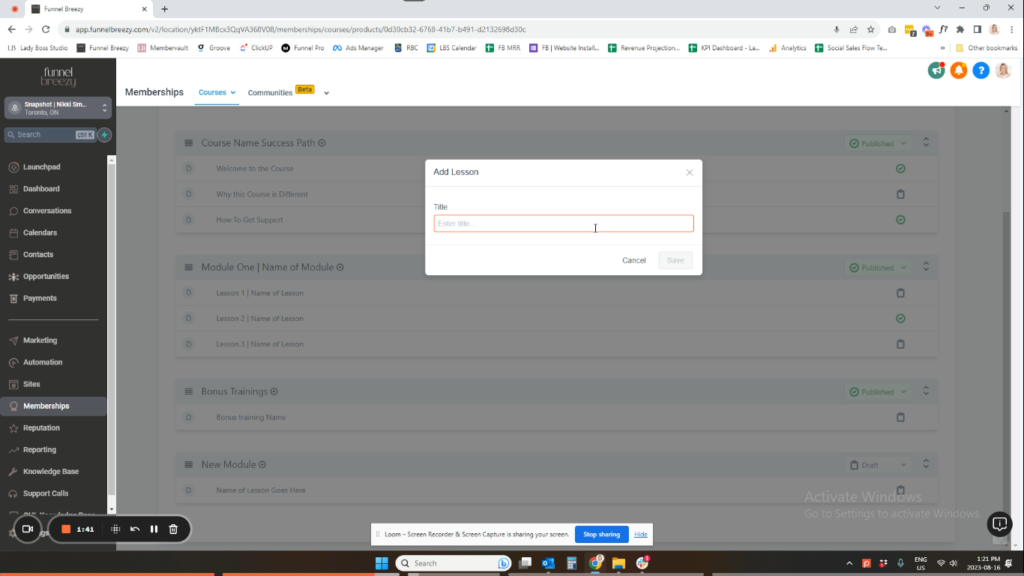
How to Add Modules and Lessons in infinity interface #
This guide will show you how to add new modules and lessons to your course in infinity interface.
Adding a New Module:
- Go to Product Structure.
- Click Category.
- Name your new module and click Save. (The new module will appear at the bottom by default, but you can move it later.)
Adding a New Lesson:
- Click the plus sign (+) next to the desired module.
- Select Add Lesson.
- Name your lesson and click Save.
Moving Modules and Lessons:
- You can drag and drop modules and lessons to change their order within the course.
Publishing vs. Draft Mode:
- A green checkmark indicates a published lesson or module.
- A box outline (checkboard) indicates a lesson or module in draft mode.
Important Notes:
- Lessons will not be visible unless the containing module is published.
- You can’t delete a module with lessons in it. You must first delete the lessons.
- To delete a lesson, click on it and select Delete. (Refresh the page after deleting.)
- To delete a module, delete all the lessons within it first. Then, refresh the page and the “Delete Category” option will appear.


